
Can’t name worth a dime.
To be entirely honest, I never truly did get a name for this script nailed down- from what you read above it feels sanitized. I had a more raunchy title like “The package your wife isn’t happy about./The side chick your wife won’t see coming.” but both felt bad on screen.
This was originally meant to be filmed near or during LTX2023 in Vancouver, however I had issues with scheduled plans and a wireless lavalier microphone in a room full of hundreds of devices.
“You want to go to a LAN party but you don’t know where you should start… all of those photos you’ve seen with two, three thousand dollar setups and RGB out the glass. But it’s not just a daytrip for most of us going to events like Whale LAN, it’s gonna be a flight. And with the weight and cost of graphics cards these days, you can’t risk bringing your whole system (you’ve seen what some baggage handlers can do). So what options do you have now?! Especially since you already paid for the flight and tickets! How can you still have the most fun possible without breaking your budget? How can I continue this video without this segue to our sponsor-
To start with, let’s choose our first budget, $500. Why $500? This is more of an option for a student who wants to go to a LAN in their college downtime. Not a lot of opportunity to work, but you’ve got some spending money to throw into a weekend trip. Most of the actual trip budget has to go into transport, the actual LAN tickets themselves, and maybe somewhere to stay overnight if you can’t do an all-nighter.
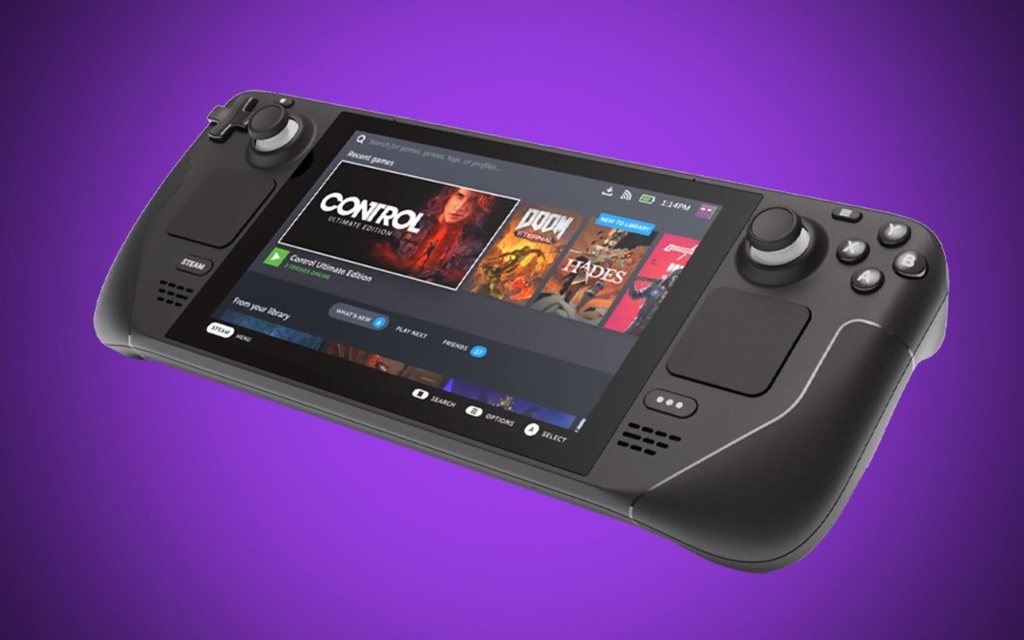
So, something easier on the wallet. you could get a base Steam Deck. To pair with the 64gb internal storage, I’d recommend a 256 gig microSD card, although amazon sales can drop 512gb cards to the same price. You’ll need to get a usb-c dock, something with ethernet should work great if it has support for usb power delivery and enough usb ports for a keyboard and mouse. They might provide an ethernet cable, but if not, somewhere around 25 feet of Cat 6 will work. Generally, you’d want a controller for some games, but look at the thing, it’s right there! Oh, and audio. You’d most likely want something small like in ear monitors. An overall good gaming experience to be had both waiting for the flight, and slaying in the fight. However, you may come across some issues loading non-steam games, especially if they require any form of anticheat. There are some useful tools for running non-steam games, like the heroic games launcher- It can install both GOG and Epic games store games and allow you to easily add them to Steam for easy access. Combine that with ProtonDB and you should be good to try running almost anything.
Stepping up to $900, there’s a lot you could do with that kind of budget. You could- get the highest end Steam deck and a whole bunch of accessories, or buy those Xreal Air display glasses if you really want to put yourself into the game… or you can actually buy a new gaming laptop from ASUS, the TUF Gaming A15. It has an 8 core Ryzen processor, 8 gigs of ram, an NVIDIA RTX 3050 Ti, a 1080p 144hz display and a 512GB NVMe. Throw another 8gb stick of ram into it, grab a mouse, and run straight into a massive team battle on blood gulch. There are just a few issues you might come across depending on the laptop you’re looking at- Like not having a Kensington lock slot, a TN display panel, and low build quality- Unlike what you’ll need to carry it, a backpack from lttstore.com.
But what if you want a bit more… for a bit less. Well, for that we have our old friend named EBaY. It does come with buyer protection, but your mileage may vary when it comes to the authenticity of a listing. For instance, this razer blade 15” from 2019. While it does come with an Intel 9th gen i7, it has an aging 2070 Max-Q. If you don’t remember what Max-Q is, I don’t blame you. It really just existed to make thinner laptops that still have “high end” GPUs. But “What does this mean for this laptop?”, you may ask- the performance you expect should be pulled back slightly even though it is called a 2070. It’s more like a 1070 that had raytracing added to it, kinda like a lime wedge thrown into bottled water. It’s good and all that it’s there, but it’s still just water. But water can still be good. 16 gigs of ram, another 512gb NVMe, a 240hz 1080p display- All pretty depending on the price you pay, but you’ll need to remember the incidentals. Things like a good usb 3.0 to ethernet adapter, maybe a new battery if the laptop’s battery is failing- you even might need to take it apart and apply new thermal paste.
Now what if you’re not a fan of gaming aesthetic, maybe someone who prioritizes regular office performance or battery life over everything? That’s where the wonder of thunderbolt strolls into play. Assuming you don’t already have a laptop, any recent dell latitude, hp EliteBook, or Lenovo ThinkPad made recently should support it, but make sure to look up your model laptop and check that it does before buying.
Already have a laptop that supports it? That’s great! External GPU enclosures are actually getting quite affordable, only $140 for this one I got off AliExpress… But I still need to get a decent enough PSU to actually run it, so the price for the whole thing is really more around $220-$260. (if you trust a used PSU) That’s still without a graphics card, and with pricing the way it is, we’ll actually need to turn back to EbAY to get some real options.
As of time of writing this, you can actually get decently performing cards, like a 3070 or a 6700 XT, for just $299, so you can actually get great performance per dollar when portability matters. I managed to pick up this 3080 for $399 when mining dropped. This video’s not going to focus past a $900-ish budget, not because you don’t have options- but because your options actually skyrocket for laptops and you’re pretty much hitting entry level for most ITX builds anyway.
Now, prices and planning are good and all, but how do these options actually perform? That depends on where you spend your money. And you’ll see what I mean in a moment. Starting from the top, the RTX 2070 max-q and the eGPU with an RTX 3080 trade blows when it comes to frame rates at 1080p, but depending on your games and setup, your mileage may vary- for instance, take a look at apex legends on the high preset- while the 2070 runs at an average of 90fps, we can see that when things get hectic, the frame rate can drop all the way to 22fps- and then this is where I thought the eGPU was broken. While trying to benchmark it, it was a stutter filled mess- while still trying to stay at a constant 77fps, it ended up dropping to almost 2fps. It was about as fast as a slideshow.
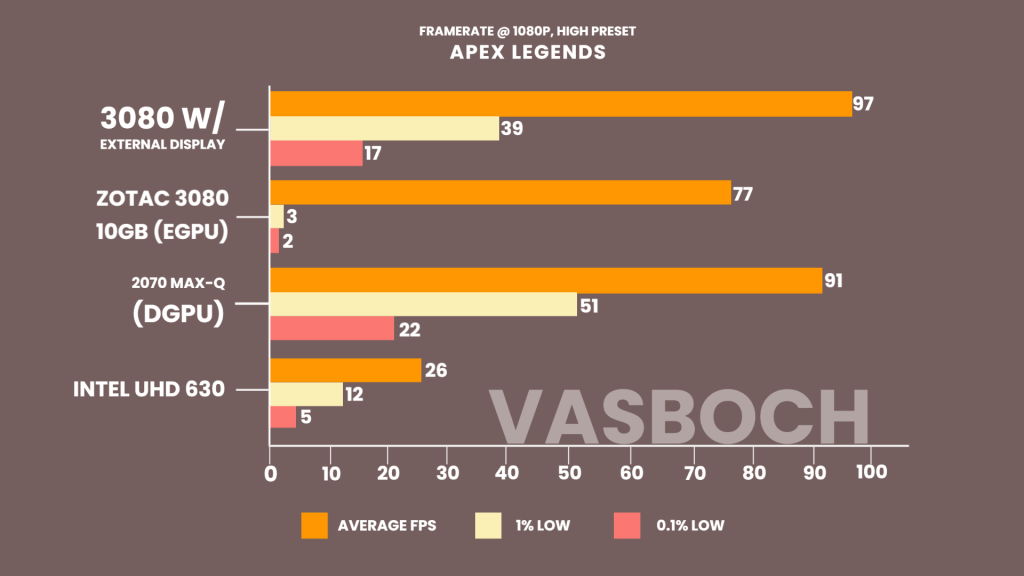
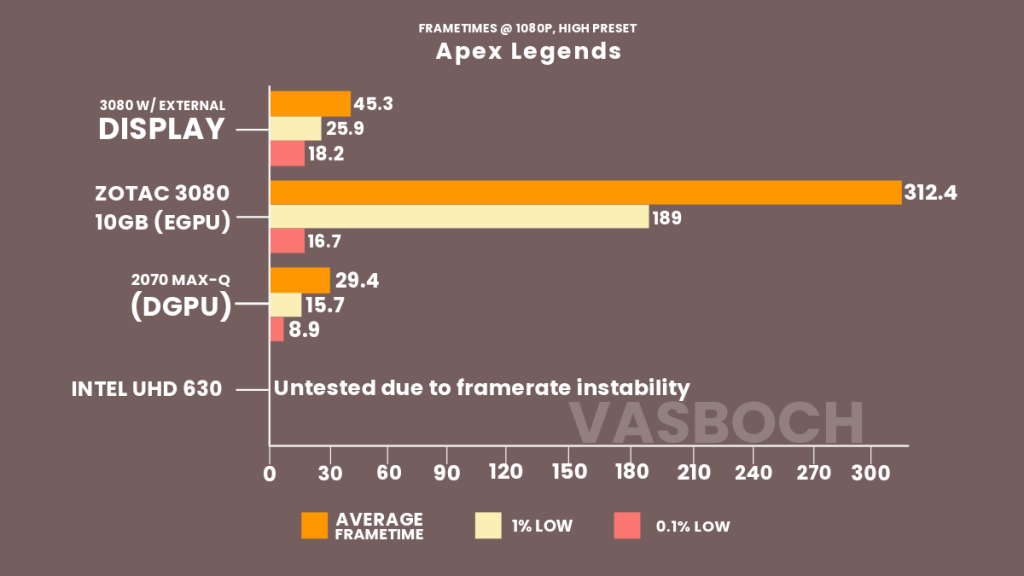
Taking a deeper look into the frame times, we could see that the 2070 built into the laptop was averaging 15.7ms per frame versus the almost 200ms average on the external GPU. I then reran the test on an external display with the integrated graphics disabled- which fixed the issue entirely. Looking at the updated graph, the frame timing issue is fixed, it’s stable at with lows of and respectively. And the frame rate got a nice bump to 97fps as well.
Moving onto CS:GO, again at high, the 3080 runs at 129 fps when using the laptops display, but jumps up to 297 when connected to an external display- That’s almost a 79% difference in average framerate, but the 1% lows are actually neck and neck, at 97 fps and 96 fps respectively. The slower 2070 Max-Q in the laptop hits 129 frames average and a 1% low of 109 fps. If you wanted to try using the graphics on the old-ish office laptop, you’ll get about 58 average with stuttering lows of 24 and 11- an effort we can at least play.

Fall guys is actually the last game to show this odd performance gap between the 3080 feeding back into the laptop’s display and the 2070 in the laptop. 136 fps to 152- an 11% difference that shows one of the issues using a connection like Thunderbolt 3. It only feeds 4 lanes of PCI-e 3.0 into the laptop, so you’re actually only getting only a fraction of the card’s true performance- which explains the frametime issues in Apex and the framerate in Counter Strike- it shows the limits of thunderbolt 3 when it comes to high speed data transfer.

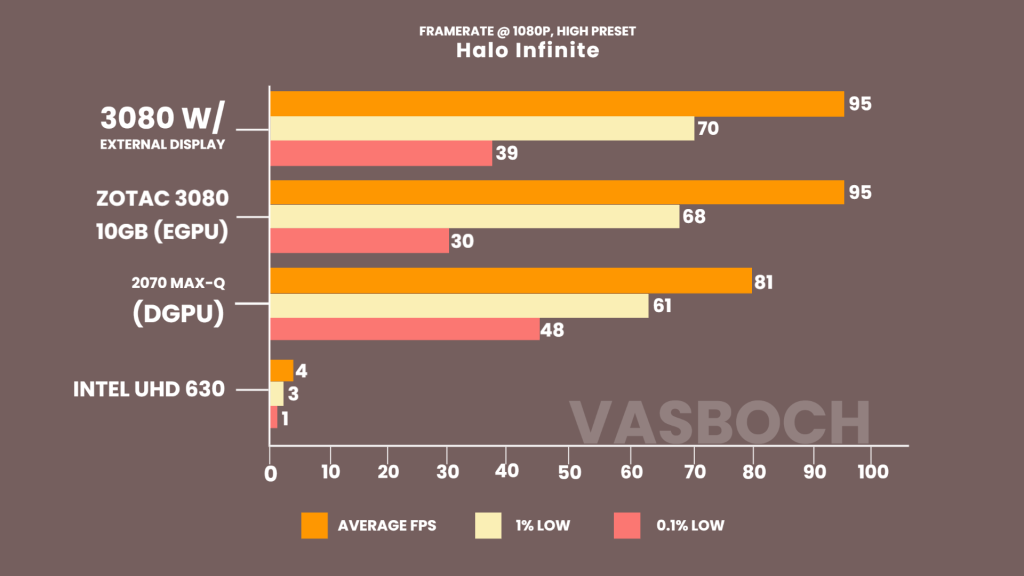
The 3080 actually performs the exact same either way in Halo Infinite- 95 fps average and lows to 70, while the 2070 actually gets higher point 1% lows- at 45 fps vs the 39 with the external display and 30 frames without it. Minecraft is in the same situation as Halo with the performance between the 3080 with and without the external display at about 140 fps, but with a dip in the point 1% lows. The 2070 is still kicking along and the integrated graphics on the CPU actually get to be playable again at 49 frames average.
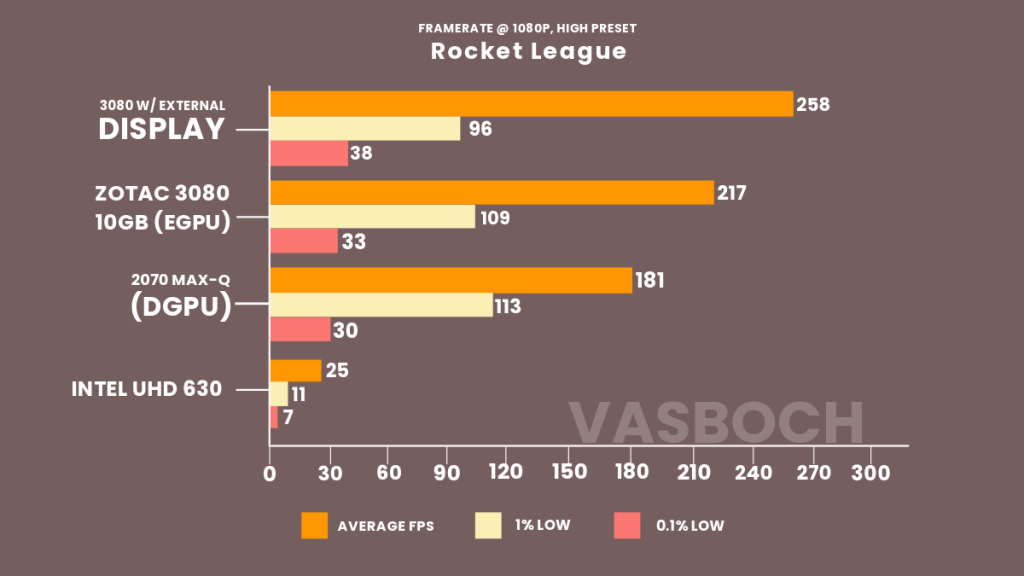
Rounding out the benchmark suite, in Rocket League- again at high, we see the 3080 play at almost 260 frames while plugged into an external display, but it drops to 217 fps when it’s feeding back into the laptop, while the 2070 sits just below at 181. All to be had a perfectly fine gaming experience.
But you may be wondering, where’s the Steam Deck? How did it do? Well, with its default resolution of 1280 by 800, you can run every game on this list at medium for a buttery smooth 60 frames a second… which means I didn’t include it on the graphs to make it easier to understand.
Honestly, everything just depends on budget and preference. If you don’t care about performance as much, but want a decent laptop to use after the fact- go for a Ryzen laptop and some upgrades to the internals. If your focus is pure gaming performance, you might try buying the parts for an ITX build or picking up a gaming laptop. Everything we’ve shown today is just a sample of all the options you can have at your disposal and I hope all that happens is that we all get to have fun together.
 Vasboch
Leave a comment